
SwitchBot Lock Ultra and Keypad Vision review: clever, capable, but not quite perfect



This article contains affiliate links. We may earn a small commission on items purchased through this article, but that does not affect our editorial judgement.
SwitchBot’s latest smart lock and keypad are packed with innovation and promise hands-free home security – but they’re not without a few frustrations
Very few people own a smart lock for their door, and it always comes as a surprise to me. They're remarkably secure, incredibly convenient, and you don't need to carry any keys with you.
I've owned smart locks for years now, in various guises, and I was more than a little excited when one of my favourite tech brands, SwitchBot, announced they were launching a new one.
It's called the SwitchBot Lock Ultra, and the headline upgrades over its predecessor, the Lock Pro, are pretty impressive.
But the most impressive bit of smart lock tech was launched alongside the Lock Ultra - it's the Keypad Vision. And it's very, very clever.
I've been using both devices together on my front door for several weeks now and, while they definitely have their strengths, they also have some weaknesses.
I'll tackle both products individually, but it's worth looking at a combo deal if you fancy them, because you save a lot of money.
In fact, at the moment, there's a 13% saving AND a voucher deal on Amazon, which would get you the whole setup for just over £200.
SwitchBot Lock Ultra
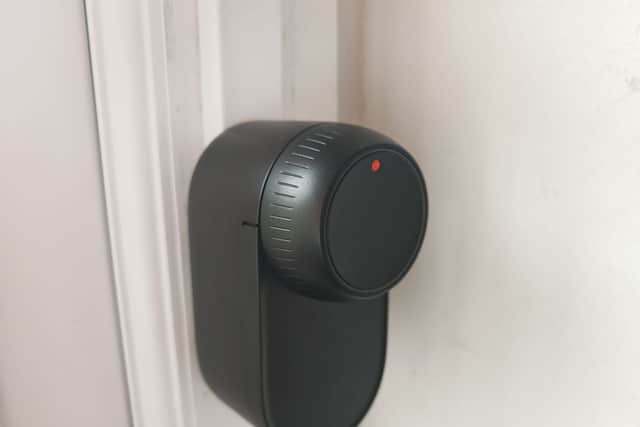
SwitchBot is a company that's well known for innovation, and for solving complex issues with simple solutions. And so its smart locks are the simplest devices of their kind.
You just clamp it to your door over the existing internal key and a motor operates the key. At least, that's the theory.
The issue comes, for those of us in the UK at least, when you realise that UK standard locks can't be operated with keys in the inside of the lock and the outside of the lock at the same time.
So while the SwitchBot smart lock will do a fine job of automatically locking and unlocking the door, you can't then use the key on the outside. Which is a bit of an issue.
It's solved by changing the lock barrel to one with a two-way key access. And that's not easy on these shores, trust me.
SwitchBot claims that the smart lock is compatible with 99% of existing doors, but that's only the case if you have the right barrel. It's fair to say, then, that my relationship with the Lock Ultra didn't get off to a great start.
However, once I'd bought the correct barrel, and got it fitted, the relationship has really blossomed. Because it's a fabulous bit of kit. And, it’s worth pointing out, some doors in the UK have different types of locks which won’t need a double-ended barrel.

Over the Lock Pro that it supersedes, it's better in just about every way. The locking mechanism works more quickly, and it's quieter.
The whole unit is more compact, and it now has a built-in lithium battery with a small backup battery. It's sensible thinking and it's turned a good product into a really good product.
To install it (once you've got the right barrel) you just put it all together, hook it over the key or knob, and stick it to your door.
To be fair to SwitchBot there are lots of accessories and adaptors to ensure it fits well, and the instructions are excellent. Barring barrel compatibility issues, you really can't go wrong.
And it's brilliantly easy to operate, too. SwitchBot's app monitors what it's doing, can lock and unlock it remotely, and there's now a one-touch button to save you the arduous task of having to manually twist the lock to lock it and unlock it. There's even a magnetic sensor included which will inform you if the door has been left open.
Such is the SwitchBot smart lock's simplicity that you only have one module attached to the door, on the inside. From the outside, it's just your normal key socket. This means you can still use your conventional key if you like - handy if you have elderly relatives who don't get on with technology - or you can use SwitchBot's range of keypad devices. One of which I'll come to in a moment.
The only other gripe I have with the Lock Ultra is that it occasionally wanders off its calibration point. It's very easy to fix in the app, but every other smart lock I've used has stayed straight and true.
Overall though, it's impressive. Despite its compatibility shortcomings and a minor tweak being needed every few months, the battery lasts for ages, it's completely reliable, and a pleasure to use.
SwitchBot Keypad Vision
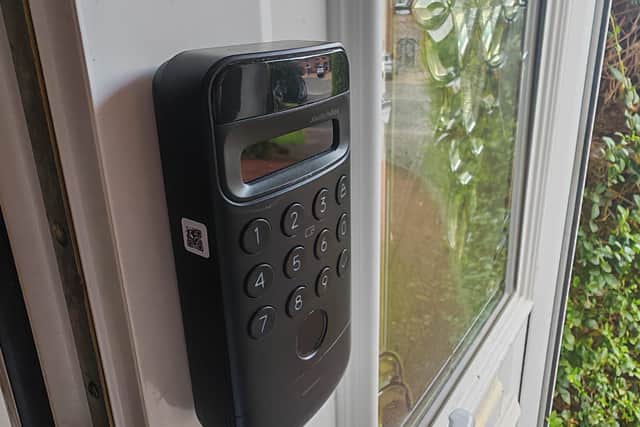
When SwitchBot launched the Lock Ultra, this new keypad design was launched alongside it, with much fanfare. And while the Lock Ultra makes your door smart, this turns it into something out of a sci-fi movie.
But first, a look back. The last keypad launched by SwitchBot, the Keypad Touch, was a relatively simple affair, rather innocuous to look at, and it opened your door with either a combination of numbers, an NFC card or, quite cleverly, a fingerprint.
The new Keypad Vision does all that too, but it looks a bit like a video doorbell now. And it also has a bold new feature - facial recognition.
This is seriously impressive, and it works brilliantly, but I've actually switched it off on mine for reasons I'll go into shortly.
Adding a keypad to your SwitchBot smart lock makes it into a truly smart system. The app makes it very easy to set up, and it will track who's using it and when.
You can set up temporary access for people you only partially like, or permanent access for people you're more fond of. You can also lock it and unlock it remotely.
For example, your cleaner can have her own code, as can the in-laws, or you can bestow on them an NFC card they can use to just flash their way in.
Or they can each set up their fingerprints and you can control and monitor their access, or you could use the new facial recognition feature and the lock unlocks automatically as they stroll up to the door.
The facial recognition is seriously clever, and it's never failed to recognise anyone I've programmed in, but it does have a bit of a flaw.

Built in to the device is a voice system that guides you towards a more effective facial recognition with simple commands if you're standing in the wrong place, or if the sensor can't quite pick you up for any reason.
"Please stand closer" is the sort of command the nice American lady issues. The trouble is, it's just not very clever. It can't tell when I'm trying to shoo away a double-glazing salesman, for instance. So I'll be standing with the door open, getting increasingly tired of being offered 0% finance, and the keypad is constantly telling me off for having my back to it. It's very annoying.
It gets worse, too. If my postman has rung my bell and is stood at my door waiting for me to answer, because the keypad doesn't recognise him, it'll start asking him to "stand closer" or whatever. And it won't shut up about it. So I've turned off facial recognition and my life is now so much better.
I've also not been able to get the NFC set up with any of my smartphones, and the geofencing isn't great.
However, it's important to add that this is a brand new product, and SwitchBot is very good at correcting these relatively minor niggles with frequent updates. I haven't had one yet, but fingers crossed something is in the pipeline that will sort this out.
Happily, the keypad sensor is flawless and works in an instant, and the code system is great if you're like me and your mother-in-law refuses to use biometrics because of the Illuminati, or something.
But that does make me wonder why you'd opt for the new Keypad Vision when the predecessor, the Keypad Touch is less than half the price, smaller and neater, and doesn't look like a doorbell.
Facial recognition is incredibly convenient, because it's completely hands free - useful if you're walking to your door with bags of shopping - but until SwitchBot sorts out the annoying American lady, I can't recommend it unfortunately.
And it's a pity, because like the Lock Ultra, it's a seriously good bit of kit.

The cult-favourite SmilePro Advanced Whitening Kit is transforming smiles at home – no dentist, no sensitivity, and no £300 bill. Loved by half a million customers and backed by 5,000+ five-star reviews, it delivers pro-level results for just £2 a treatment.
Using dual LED light tech, blue light lifts deep stains from coffee, wine, and smoking, while red light soothes gums and fights bacteria. Each kit includes 30 treatments and can whiten teeth by up to eight shades, often in just a day.
With UK shipping and a 30-day guarantee, SmilePro makes whitening easy – and it’s now 50% off.
Allica Bank is changing how UK businesses make their money work harder. Its Business Rewards Account offers high interest on idle cash and up to 1.5% cashback on everyday spending - without the need for risky investments or complex setups. With a fully digital platform, seamless integration with Sage or Xero, and dedicated relationship managers, it’s a smarter way to manage your funds and boost your bottom line.